Tuesday, October 15, 2013

Put This Cake in your Face

Wishes App

I think one of the most challenging aspects for new students in C.S.  is the massive amount of tools, languages, and libraries that are accessible at the click of a button.  It is overwhelming and confusing and distracting.  When I started making the functional part of my application in JavaScript, I kept asking myself (and others), "...but why am I doing this in JavaScript?  I know I want my content to be dynamic, but why can't I just use PHP?"  People kept saying, "JS is for client side stuff and PHP is server side".  I'm thinking, yeah I effing know that, but how do I know what side I need to be on!?    

I actually took a semester of PHP last year and when it was over, I never wanted to use it again.  Forms, forms, forms.. all these stupid text fields and buttons and checking variables and sanitizing input - it was so dreadfully boring I just wanted to claw my eyes out.  So I was surprised when I caught myself thinking that PHP would be easier to use than JavaScript.  I assumed it was because I had only been using JavaScript for 2 weeks and it would just take some time to figure it out.  So, I spent another week trying to figure it out.  At the end of the week, I was so frustrated and felt like such an idiot, that I decided to take a week off for my birthday and not think about it at all.  In hindsight, a week might have been a little excessive... but I came back and rewrote everything in PHP.  In a day. Everything works perfectly on mobile too, which is a big relief! 

If you look at the app, you will see there are several more pages than I had before.  I think it gives a better feel for where I am going with this application. (Hopefully it is "fleshed out" enough for my professor...)  It appears as if I have done more work on it than I had before, but in reality, I am pretty much at the same point I was.  First of all, the way I have the pages mocked up, is not how I will actually be creating the cards.  The only way I found to convert a <div> into an image, is by using  html2canvas.js. (Which, by the way, is amazing and works perfectly and the guy who created it is super helpful)  But, for my purposes, it will be more efficient to just draw the cards directly on the canvas and skip the conversion.  Especially since I figured out I can use non-system fonts in the canvas!  I have a basic canvas drawn card working in the application right now.  This week, I will get my canvas saved on the server and decoded back out as an image that the user can email, save, share, or add to their user page.  Once I get that function working, I can concentrate on setting up the card design database.... which is going to be SO fun!!!

How I felt today:  


Thursday, October 3, 2013

Your App Sucks!

Last week, I was dreading doing the reviews of my classmates' websites.  I knew it was going to take forever... and it did.  I spend a lot of time researching random shit on the internet, so while I was watching the presentations, I kept thinking, oh, they should read that article I found about ____.  Since I HAD to do the reviews, (What? I have to give my opinion on something?! Fine, twist my arm.) I figured I might as well make them as helpful as possible by including links to resources I felt were applicable.  I was also one of the only people in the class that put my name on all of the reviews I did!  :) I am not talented at writing for copy, so I end up typing exactly like I talk.  I figured it would be pretty obvious which reviews I wrote.  If you've ever gotten an email from me, you can probably read it and picture my facial expressions and hand gestures as you read it.    

I'm glad our professor allowed anonymous reviews though because I feel like it helped some people to be more honest.  A lot of the reviews I got made me laugh.  This one might have been my favorite:
What is it with women and greeting cards? I’ve never personally seen a guy who cares about them and almost every woman I know has to send one for every little thing. Maybe it’s sampling bias on my part, but this seems like a thing. At any rate this IS innovative, I can see something like this getting used a lot. The layout/design is very modern (apparently flat page styles are big these days, I guess they display well on mobile devices)

Overall, a lot of the guys did not get the purpose of my app.  I am confident that once I get done, the guys will all understand what I'm doing and will find a use for it.  At first I thought, eh - whatever - but it did occur to me, that I would have to figure out how to market this to males.  This comment gave me an idea of how to do that:
“Wishes” is a greeting card maker of sorts. I also see it as a meme generator. You type in a phrase or wish and click make card. This generates some randomized card with what you typed on it for you to send to a friend.
Exactly. Guys like Memes.  Taking the male/female use aspect into consideration, along with these next comments, I have a better idea of how I need to remake my landing page.
Maybe have a stream on the front page of the recent cards people made. So you can hear the cute things people say to each other and that would give you an idea of what you might want to say to someone. Or if you like the card someone generated you can just steal theirs. Im a lazy guy and that would be nice for us males to have… We can look romantic and still be driven by other goals.
If you are wanting to keep the card creation page clean, maybe consider a landing page with samples and information about how to use the cards. 
Here were some other comments that I found helpful and will be thinking about as I continue to work on the app:
Right now, the “make card” button only makes a card in one format at a time. It would be nice if the button would create multiple card options with one click. It would also be nice if users could select the card look before entering the text.  

The worst feature is probably the flat white background; while white goes with just about everything it lacks character.

Site has a slightly clunky feel to it – maybe it's the look needs to be more flashy or the speed of the plugin. I'm not sure.

Thank you everyone for taking the time to give me your thoughts.  I'm really motivated now to get this application up and running!

Sunday, September 22, 2013

Javascript: Weeks 3&4

Here's my Webpage.....

Quiz: 18/20

We've spent the last two weeks working on site design and javascript. At this exact moment, I feel like I still have a long way to go in both areas.  However, I finally feel like I am at a good starting point for my website.

Last week in class, I was mildly distressed about the future of my website. I had jumped in the week before and started writing the javascript to create styled elements on my page.  The problem was, I wasn't able to make the elements display correctly in CSS alone.... so obviously I was not going to be able to tell Javascript how to do it either.  I got a little panicky when I realized I needed to take a step back and spend more time on Bootstrap CSS/Components the week before our exam.  The most basic functional requirement of my website is to take user input from a text box and display it with a custom CSS style.... the CSS is actually part of my application.  It's not just something I'm using to format my page or make it look pretty - it has to work.  So I studied all weekend and I am super excited to say, I got it working!!

I will rundown the basic mockup and try to explain what I have done and where I am going with this.

Home Page

User can type text in the message box and a "card" will be produced and displayed.


Make Card

I used javascript to get the information from the textbox and create a new element that has a style sheet applied to the text.  Right now, I just hardcoded the style sheets and used the random function in javascript to simulate what the database will be handling later.  There are buttons below the card that allows user to download the image to their computer (or camera roll on mobile), send the image to a friend, or trash the image. Social media sharing buttons will be added too.  None of these buttons work right now because I have no clue how to convert a div into an image... Which is my next task to panic about.


Log In Page

Users can start accounts to store their "cards".  Other people with their page link will be able to post messages on that users' page.  The user will be able to pick a theme (or not) when they open an account, which will correspond to a certain set of style sheets that will be used to make their cards.


Display Page    

This is how I want the user account pages to look.  I want the cards displayed as a single page collage.  Kind of like a Tumblr blog, but with a pretty message/quote creator integrated, AND a public (with permission) submission option.


Functional Requirements to Address:


  • how to convert the div to a jpeg 
  • setting up a database for user accounts to store jpegs
  • use the database to store variables for the style sheets to create cards
  • study the collage plus code to see how I can use it to make my grid pages


Non Functional:


  • more in depth formatting for text layouts 
  • more formatting and planning for mobile screens
  • error handling - can't make a card if text box is empty


Monday, September 9, 2013

Yay! for Frameworks: Week 2

I started the landing page for my Wishes Web Application using the Bootstrap Framework.  On a side note, let me just say, I love that copying someone else's code is referred to as "using a Framework".  In addition to the framework files, Bootstrap also provides some basic sample templates.  I choose the Carousel Template for my landing page.   It is currently in an unfinished state, because I was having trouble deciding how much content this landing page actually needs.  At this very second, I think the landing page is done and I need to cut off the bottom, unfinished content and move on to the application layout and design.  We are starting Javascript this week and I would like to have my application design completed so I can work on the code in class.

Color Scheme:
In my head, I see the end result of this application as a single web page, full of various sized pictures, formatted into a collage layout, with the text of the user messages displayed in various fonts and sizes. Eventually, it might be cool to have he user upload their own pictures, but for now I just want to use generic, simple background photographs.  I originally imagined this page to be in full color... but after working on my landing page, I think I am going to start off using only black and white backgrounds photos and allow the user to pick their text color only.  And possibly restrict the color scheme for each account.... for example, if someone starts a baby wish page for a friend, they would pick the color scheme when they create the account.  That way it is guaranteed their page will look pretty.  I can imagine Aunt Brenda choosing some off color and messing the whole page up.

For anyone wanting some design inspiration for their site, Specky Boy always has posts with examples of well designed web sites.


Tuesday, August 27, 2013

{Women in Technology} Thoughts #1

Over the last year, a few people have asked if I was worried about going into this “male dominated” field and I really didn't understand what they were talking about.  I spent the last 8 years working in the construction industry, which was a male dominated industry, so I have no fear of finding my place in the programming world.  I have read articles about women in tech being treated negatively, naming discrimination as the cause, but I'm kind of oblivious to things like that.  I'm not saying it doesn't exist, but I work pretty hard to know my stuff and I NEVER pretend to know stuff I don't.  I also enjoy helping other people feel good about themselves, so typically my coworkers and bosses love me and treat me kindly because they appreciate my help.  

Over the summer, I attended Codestock (which was AWESOME) here in Knoxville.  At the conference, I never received any negative comments about being a female programming student. The conversations I had at the “after party” were a little more interesting… alcohol is great for that.  So, I will share a couple of the conversations I found amusing.

Before the party started, Rachel and I were sitting at the bar talking to a couple guys.  When she told them she was a programmer, one of them asked, “So, where do you  work? Jewelry Television?”
She laughed and I thought it was a little strange that they would try to guess where she was working.  I can’t remember ever guessing what company a person worked at when they told me their field.

Downstairs, I was asked a few times if I was a recruiter… which I also found strange.  Later, I was informed that could be taken as a compliment, because "usually the only pretty girls at a coding conference are the recruiters". I can see how maybe a veteran female programmer might get upset about being asked if she was a recruiter, but not me!  I chose to take that as a compliment... because I love compliments. :)

I did have one awkward conversation with a guy, which left me slightly offended.  I don’t get offended easily… but he said to me, “You will never get a job wearing stuff like that”.  (The dress I wore is at the cleaners, or else I would post a picture of it here)
I thought to myself, "Ummm, excuse me… but this is BCBG I’m wearing!"  I mean, it’s not Versace, but this is Knoxville.  He went on to enlighten me on what I "needed to wear if I wanted to be taken seriously" (which he described as cargo pants and a long sleeve tshirt).  He suggested that I look up the women CEO types of Facebook and Yahoo to see the "appropriate" way to dress.  So, I did as soon as I got home!  


I was relieved to see these famous women in tech looking fashionable in their cute dresses and stilettos.  Just for the record, you will never see me show up to work in cargo pants.... well, actually I have a pair of white cargo pants from Guess that scrunch up on the sides with little ties.  I would totally wear them if they still fit me.

So, guys, please... Rule #1: Don't give girls fashion advice - especially if we don't ask.

I'm happy to say that my experience meeting people in the industry has been positive so far.  Everyone at Codestock was super nice and I can't wait to go again next year!   I hope to make another Codestock post with useful information... like all the links to the cool sessions I took.  But school is starting this week, so I'm not making any promises.  


Monday, April 29, 2013

JAVA: Genetic Algorithms {Week 12}


Chapter Nine in our text book, Nature of Code, the author discusses 3 strategies to implement genetic algorithm theories in software.  
  • The traditional computer science method
  • Interactive selection
  • Ecosystem simulation   

From my understanding, these theories are used mostly in the research side of the computing field, especially in AI and evolutionary computation.   After our class trip to ORNL last week, I imagine that most of the fields using the super computers also use evolutionary computation somewhere in their research. 


I think the fact that this chapter was my favorite chapter in the whole book, is a strong indication that I would have a lot of fun working on a team doing simulations in astrophysics at ORNL.  Or maybe in their brand new 3-D visualization lab…..  If I could just keep my head out of those clouds.  **Sigh**  

My Project for WEEK 12:  Sexy Lady Creator

Method:  Interactive Selection

Heredity and Variation:  Value ranges assigned by me (using the Nature of Code algorithm)

Selection:  "Fitness" levels are chosen by the user (after all, beauty is in the eye of the beholder)


Existing Variables:
Body Curvature
Body Height
Breast Radius
Smile Curvature
Smile Length

Other Possible Variables:
Eye Size/Color
Eye lashes
Lip thickness
Hair length/Color/Thickness
Skin Color
Personality

Notes:
This project was inspired by several subjects I have studied over the past few years including, Art History, Psychology, Statistics, and (obviously) Programming.  The basic idea I was forming with this project was an application that could be used for fun or to gather data on what people perceive as beauty.  The idea of gathering data on people's opinions of beauty is nothing new, but for some reason it never seems to get boring.   Maybe because the variables seem to change with every culture and generation.  I have read studies where scientists use pictures of real faces to survey what we think is attractive - based on overall measurements or bone structure.

My project is quite different, mainly because I use basic shapes that are "drawn" and merely imply a female figure.   I chose to use the female figure for this project (in my class of ALL guys) in hopes that I would get extra credit for the use of boobs.  :)  HaHa.  An application like this could have a much wider range of use though.  The basic concept of organizing shapes and lines in a way that is aesthetically pleasing is useful in every industry - architecture, marketing, advertising (print and web), manufacturing - people want to see beautiful things.  In my project, I was trying to focus more specifically on figuring out what design elements are aesthetically pleasing in animation.  Considering the recent reports that the global animation industry pulled in over $222 Billion last year, a fully developed application of this kind could be useful.   

I haven't done much research yet on the animation industry, but I'm sure there are studies out there on what users find pleasing in animation.  I have heard that eyes are a major factor in animation.... In fact, even Dr. Doofenshmirtz tried to use his "Big Sad Eye Inator" to rule the tri-state area in this Phineas and Ferb episode.   Here's a clip of the show for anyone who is not familiar with this hilarious series...


Monday, April 22, 2013

JAVA: Fractals {Week 11}

Moving right along in this Java class.... fractals.   Last semester was the first time I had ever knowingly been introduced to recursion and fractals.  At the time, calling a function from inside itself seemed messy, complicated, and cannibalistic.  I hardly understood what a function was, so I was not ready to think about how I could use recursion in my code.  I still found the Mandelbrot Set interesting and I thought the colors and patterns were very pretty, but that was as far as I could go with it at the time.

I found a random quote on Instagram one day that I don't completely understand, but for some reason it reminded me of me.  I had forgotten about it, but coincidentally, I thought of it again while looking at these fractals in class this week....
"Easily attracted, dangerous to distract me."
What does that even mean?  I don't know, but I'm sure there was a good reason it popped into my head that day, and I'm sure it relates to fractals... well, because, doesn't everything?

After this chapter, my new thoughts on Recursion: it is beautiful, powerful, and magical.  This time, looking at a section of the Mandelbrot set, I was completely intrigued by the patterns that were forming in the background space with one of the color combinations.


The strange thing is, I guess that's not really the background.... it's all fractal code, there is no background, it goes forever.  When we zoomed in and I saw the 3 dimensional effect, with the varied wobbly overlapping petals I just had to try and draw it!  I couldn't even come close.  I haven't kept a sketch book in years, and it shows. I probably could render something close (in greyscale with a pencil) if I spent some time on it.  


If I spent even more time, I could probably create a similar effect with acrylic paint too.  That's the thing though - I already know I can do those things.  I will always love working with materials with my hands, but I am in complete awe of how this effect is being produced with pixels on a screen.  That's actually one of the reasons I chose programming - it's all brand new to me.


In some ways, a screen doesn't seem that much different from paper.... except  paint is a pigment- it's a layer.  Pixels are light?   Anyways, seems like a fun new hobby for summer... you loose some you win some.


Local Fractal Artist:
I ran across the website of a fractal artist in East Tennessee - Steven Lareau - He has been working with Mandelbulbs - a 3-D version of Mandelbrot!  I thought it was pretty cool and I love to share the work of local artists, so check it out if you can.


Fractal Tree Branching

(click picture to see in action)


 My fractal field needs more work.  This will be all for now.


Monday, March 25, 2013

Python Chatbot

This week, I have a really fun assignment of creating a chat bot in Python.  When I took 1110, I spent probably a whole day looking at different chat bots online and watching the funny videos (Are you a unicorn?), so I thought I had a pretty good idea on how the program should behave.  I also knew the basics about the Turing Test and that ultimate goal of the Loebner Contest is to create a computer program that is indistinguishable from a human.  My initial thoughts were, that the computer would require huge amounts of knowledge to accomplish this, along with some really good speech patterns.

Today, in our Java class, we watched a TED talk on Stephen Wolfram .  In the video he shows the Wolfram Alpha application, which appeared to be way smarter than Google!  It has an incredible amount of information about math, physics, science, history, tons of other things, and even linguistics.  I say it's smarter than Google, because the Wolfram is not just producing a list of web pages (half of them spam) for the user to hunt through to find the information they requested.  The Wolfram contains highly detailed, specific information about the subjects.  - like a universe size reference book.  I thought, man, if anything could pass a Turing Test, surely that thing has the ability.

But, after second thought, no... not really.  First of all, no human has all the knowledge of that thing!  It also occurred to me that "book knowledge" might help a computer appear more human like, but it's still missing something critical.  I guess compassion and understanding would be the main thing a chat bot needs to pass a Turing Test.  It's not just responding to answers with knowledge, it needs to respond with feeling and emotion.  It would need to be programmed to have beliefs on things that are good and bad and moral.  Just being able to figure out if someone is talking about something they have negative feelings about or positive feelings about could take a chat bot pretty far.  One variable that will play in the chat bot's favor is that so much emotion is already removed when communicating via text, and people continue to increase their amount of text based communications.  I can't even count how many times I've gotten email replies that I swear could have came from a robot.  I ask a multiple choice question and I get "yes" for a reply.  #soAnnoying.  Anyways, I'm sure there are lots of smart people out there working on chat bots with feelings and moral standards.  :)

I'm trying to program my chat bot to respond in a peaceful state of  zen to hide the fact that she has no emotion.  <3

Tuesday, February 19, 2013

JAVA: Oscillation {Week 4}

I just wanted to make a quick post about Week 4 before I post my Project.... Week 4 was really awesome! Chapter 3 starts off with trigonometry (?).  I don't have much to say about that, except that I need/want to brush up on my math skills so I can use these concepts efficiently.   But, even with my lowly Pre-Cal skills (and our amazing textbook), I was able to create some really cool things!!!

Here's a sneak peek at something I am using in my project. 
(Click the picture to see the action)


Sunday, February 3, 2013

Creating my Quixotic Virtual Ecosystem


Creating a virtual ecosystem in Processing was such a fun project in my head.  As we worked through the first 2 chapters, I kept notes on how I could implement the various algorithms to create the artistic elements I wanted in my world.  It was all so perfect.

Sooooo, here's what I've got.  Some softly bouncing pink clouds.  Yes, bouncing... not floating (yet).


There were all kinds of principals in the first two chapters that I think I should be able to apply to these clouds to make them move in different ways.  We learned about randomness, and noise, and how to move vectors with their location and velocity.  All these algorithms work perfectly with the Processing shapes they use in the examples, but there were several times I could not figure out how to make them work with my program or image files.  That was pretty frustrating and very time consuming, so what I have done is the best solution I could come up with for now.  The next chapter we are working on includes wind force, so hopefully my clouds will be floating around by tomorrow.

Friday, February 1, 2013

Shell Scripting != Java

Last semester, my Java professor told us that once you learn the basic concepts and patterns of one programming language, it is fairly easy to learn other languages.  I found that to be true when I started playing with Python, PHP, and now Processing.... but Shell scripting totally threw me for a loop.  I have never worked in an environment using a low level language, and I didn't realize what the differences would be.  Our first Shell class was similar to my first Java class.  We went over lots of basic commands and how to use them.  Our assignment was to write a script that would echo information from some of the commands we learned.  We were supposed to figure out on our own how to use echo and specifically, how to echo special characters.  I looked in the unix manual to find out how to echo the special characters, and this is what the manual says:


Ummm, ok.  Nothing about special characters.  Nothing about correct syntax or any examples of ways to use it.  What's an alert?  How would it even be possible to echo a backspace?  I remember being slightly lost with Java's API the first time I looked at it:


But at least it uses complete sentences in the explanations and has links to the info pages on related commands. After searching Google and listening to last week's lecture I realized that echo is println.  :) Duh.  Once I realized that, everything we were doing made so much more sense!! 

This week's lab we are going over conditionals and loops.  I am comfortable with these concepts, but it is still very different from Java.  


This is what I got started in class.  The first line of the program just drives me crazy.  For name in *... Ugh.  Not declaring variables seems so unorganized.  And what an awkward place to create a variable. I feel like I am telling the computer, "For as many, (name of a variable that you have no idea what it is yet), in all of this directory..."   And there is no =, which seems necessary for an assignment statement.  I think Shell is kind of like the teenage girl of programming languages.  "I already know everything, don't talk to me, and good luck trying to figure me out because my user manual sucks."  

That's my current feelings on learning Shell, we will see how I feel about it next month. Now I'm off to finish this lab....  I'm trying to figure out how to tell it to add the word counts together, when there is all that extra text in the output.  I wish I had a parseInt.  :)  


Sunday, January 27, 2013

JAVA 1520

My second semester of Java with Dr. Brown and I love that we are getting straight to work!  Dr. Brown doesn't mess around... well, I won't say that.  It sounds like he spent his Christmas Break messing around with Processing and our new textbook, The Nature of Code .  When he told us that he spent his free time reading this book, it definitely gave me hope that this semester will be a little extra interesting. The day before class, I was reading the notes and glanced at the introduction of the online textbook and I immediately knew I would love it.  It is filled with examples of code for pretty little moving drawings with instruction and explanation mixed between.  After reading the whole introduction, I am excited about quite a few things....

  • Being able to apply everything I learned in Stats directly to my field of interest - in a useful way
  • The connection of code with nature - especially after ending last semester with the Fibonacci stuff
  • Thinking about programs for AI types of applications 
  • Looking deeper into algorithms and patterns
  • The artistic possibilities that this semester might provide

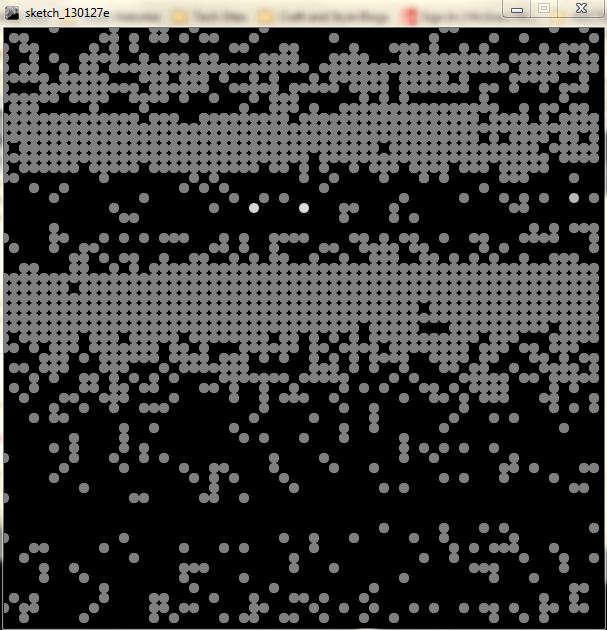
Here are some screenshots of the Introduction Examples:


Bell Curve
Probablility


This was one of my favorite examples, although I wish I could have spent more time on it.  The one thing I didn't get to research is why the dots all end up grayed out as other dots appear on top of them. I think it might have something to do with the background specified.  

Standard Deviation and Mean


Here I changed the standard deviation so the dots would appear farther apart.

Standard Deviation and Mean 2
 Many times while I was working through these examples, I was reminded of what I messed around with over Christmas Break... which, at the time seemed counter-productive and made me feel like I was wasting precious time (although, with 2 sick kids for 3 weeks straight, nothing too spectacular could have been done).  I ended up downloading every photography app there is in the AppStore while I laid there in the dark waiting for my kid's cough medicine to kick in.  As far as editing pictures, I used Instagram, Vintique, and Lumie the most.  Lumie has various bokeh overlays for photographs, and as soon as I completed the Standard Deviation Example above, all sorts of thoughts started going in my head.  I wonder if this is how they make those apps?  Do they use this formula, or do they just stamp the circles in a way that looks good to them?  Could I make a better app by using this formula - or an app that can do more than just apply one particular overlay pattern?

I just hope that one day I will have the luxury of time - and that I can take these whims of inspiration and see how far I can go with them.  I guess I still have a whole lot to learn before doing all that.  I just need more time...


"One who syncs in tandem with the Fibonacci spiral, can skip universes, dimensions and realities, by controlling something called TIME." 
~Ethona   

Friday, November 9, 2012

Org Charts

I have been struggling with the task of making an Org chart for a few months now.  I started working on this project in July, but when school and volleyball started in August, I didn't get a chance to finish.  I met with the chair of this project last week and I realized half of what I had started wasn't really right anyways, so I started over.

I heard that Vizio was the best tool for making org charts.  I wanted a tool that would import data from a spreadsheet into the org chart and update itself when I updated the data spreadsheet.  I wanted expandable boxes and I wanted it to look pretty.  I can't figure out how to do any of that in Vizio (Yet!), but at least I was able to input my data by cut and paste, fairly quickly.  That's the good thing about Microsoft products - I can poke around in it for a few minutes and figure out how to use most of the tools.  Today was the first time I have ever used Vizio (and the first time I have ever created or used an org chart), and I finished in about an hour.  It's not the most beautiful thing, but I plan on opening it back up next week to straighten up the page layout. You can see why I wanted expandable boxes...  This thing prints on 9 pages.


Even though the task is completed (almost), and I have 5 more urgent tasks I should be working on.... I couldn't stop myself from searching for my dream org chart software when I got home.  As usual, I found a whole bunch of people asking the same question as me, but not getting any answers.  There seems to be a lot of free software out there for making flowcharts and mind maps, but nothing special for org charts.

I ended up downloading 2 apps from the Chrome Web Store. They are pretty cool, so I thought I would share them.

One is called Lovely Charts 


and the other is Lucid Chart


I liked Lucid chart a lot and it does have org chart drawing pieces, but it seems to be geared towards creative applications.  I played with the org chart for over an hour and never got it completed. They also limit the number of pieces you can use to 60 (on the free version).  The lines that connect the boxes count as a piece, so I would not have been able to complete my project with out purchasing the full version.  I'm going to keep it on my dashboard - I think it will come in handy for a different project.   


Sunday, October 28, 2012

JAVA Week 9


This week, we learned about inheritance and how different parts of classes can be passed into other classes.  Our assignment was really fun!!  We were supposed to write a class that extends the main Finch class  - that includes methods that could be used to turn our Finch into a controller.  The methods are supposed to be generic enough to be able to use the Finch to control various possible games.
The methods that we had to include and write the code for are:


  • calibrate buttons
  • is left button down
  • is right button down
  • change in accelerometer x, y, and z individually
  • change in accelerometer x,y,z in one reading

I got stuck for a little while on the accelerometer methods.  Well, not writing the methods, but figuring out how the accelerometer worked and how that information would be used for the controller. I think I did a pretty good job.  I used a dialog box in my calibrate buttons method - which I thought was pretty clever.  :)  I wish we could look at everyone else's code to see how other people wrote their programs.  These are really small programs, so I'm sure there are not that many correct ways to write them, but still, it would be fun to see other people's thought process.  I hope mine is right!!


My Finch got a makeover.  Yay Glitter!


Monday, October 8, 2012

Learning Methods

So, trying to code last week's programs in the hour before class didn't work out exactly as I planned.  My programs are working fine, it is just taking me a little longer to type than I expected.   After today's class, I am really wishing my work from last week was done.  I am going to hang out in the library until my night class starts so I can finish them.

Today, we started learning about methods.... making our own.  The assignment for this week, is basically taking all the programs we wrote in the first 4 weeks and combining them using methods into one big giant program.  We were also introduced to the JOptionPane dialogs - which I love, and I'm not sure why we didn't learn that sooner?

Just to be honest....
During class, there were a few times that I felt like shoving a handful of cotton balls into my professor's mouth.  I was able to keep up and I felt like I was understanding - for the most part - but if I would have had a little more time to play with the examples, I think it would have a better grasp on it.  After class, I understood why he was moving so quickly through the first part.  The remainder of class he went over our assignment - explaining step by step how to plan the program out.  It would have been really confusing if we would have had to stop in the middle of that process and pick back up on Wednesday.  I'm super excited to get started on our assignment for this week.  

Sunday, October 7, 2012

JAVA Week 6: Arrays

I really enjoyed this week's homework assignments.  Figuring out the assignment is my favorite part.  I have started a routine with these assignments that seems to be working out alright.  First, I write a very basic flowchart, just to talk myself through what the program is supposed to do.  Then I write a more detailed flowchart that includes some of the more complicated parts of the code.  I ask my questions at this point, making any needed changes before getting into NetBeans.   My main problem with this, is once I am done figuring it all out, I don't really want to type it into NetBeans.  I feel like the puzzle is solved, so I'd rather move on to the next problem than sit and type code.  Although, to be honest, once I do start typing the code, I find all kinds of extra little problems that I didn't know were even possible.

That's another reason I love learning with the Finch.  We get to design these programs from start to finish and every piece of code must be perfect for the robot to work.  I feel like I am actually learning how to design a program, as opposed to just learning how to write Java syntax.


Friday, September 14, 2012

JAVA Week 3

I think it's safe to say I am official nerd now.  I am working on my Java homework on a Friday evening, because I want to. Yay Nerds. This week we are working on conditionals.... "if" and "else" statements.  The flowcharts came to me very quickly and easily this time.  The first problem was to write a program that has the user hold the Finch in one of four positions and the Finch tells his position.  I started out trying to get one if statement to work, before I put the other four in the program.  That was a good idea, because my first one wouldn't work.   After spending an hour looking over my notes and the professor's notes and even watching a  NetBeans tutorial, I was finally reminded about the "no semi colon after an if" rule.  


After I fixed that, it was smooth sailing and everything worked beautifully.  A little while later, my mom stopped in and was intrigued by the Finch and really wanted to see what I wrote for it.  I ran the program in NetBeans, so (as some of you know) all the text is printed out in a little window at the bottom of the screen - which confused her right off the bat.  After we got past the lame interface issue, we successfully ran the program and she said, "Is that all it does?"  I replied, "Yeah, it tells you which way it is facing."  She laughed and said, "Well who the hell cares about that?"  All she really cared about was whether or not I could fix the Java Updater error she was getting on her desktop.
Beginner programmers get no love.  

Wednesday, September 12, 2012

JAVA Week 2.5

The main concepts of week 2 were declaring variables, assignment statements, operators, and output.  Very simple, basic, functions.  These concepts were really easy to understand when we were doing text only sample programs on the board - I totally felt like I understood everything.  So, I was really frustrated when I was struggling to apply them to our Homework assignment with the Finch.
In the examples the professor does on the board, the programs are made up, so, the programs do whatever he says they can do.  The Finch has a library, so it can only do what  the library says.  Also, there were a few key statements necessary to control the Finch, that weren't discussed in the examples on the board. One of them in particular was the "scan.nextInt" command. 

It was very difficult for ME to go from writing a text program that figures sales tax to telling the Finch to get information from it's sensors and then move it's wheels based on that information.  I know the text examples were supposed to easily and gently introduce us to Java syntax, but...... It confused me to have meaningless programs explained verbally on a whiteboard and then make me try to figure out how to apply those concepts in a platform I have never seen, using a "library" that I didn't truly understand.  I think that I would have caught on quicker if he had started off writing Finch programs in NetBeans and let us follow along.   

I finally got it today. (I think)  Now, looking back at the homework problems, I see how easy they are.  I see how the professor tried to make it easy and spell out exactly what he wanted us to do, even giving us hints on how to make the program work.  I am actually excited now to start the Week 3 homework to see if I really do understand it!   I am so glad we are using the Finch and I am glad that this class is going to be challenging.  


Sunday, September 2, 2012

JAVA Week One


It is only my first week of school and I love my CS classes already.  The Professor for my Java programming class is using the Finch Robot instead of a text book.  I am actually surprised that any computer science teacher would use a textbook.  I took CAD for 2 years and I don't remember opening a textbook ever.  The Professor would work on her computer and we would follow along.  Then we would get a sheet of dimensions and draw on our own.  I guess the difference is, architecture is objects and programming is mostly text.  Also, teaching how to USE a program must be different than teaching how to CREATE a program.  I think the Finch will be way more fun to practice programming - instead of just running text programs in that dreary Net Beans.

I have a feeling everyone says this, but I think it's not the actual "programming" that interests me.  All this Java, language, detailed, syntax crap kind of makes me feel bored.  I feel like I can look at a list of Java syntax and memorize what it's function is.  Yay Syntax.  Not me - it's those algorithms that fascinate me.  I can't believe how much I struggled with the extremely simple problem solving exercises we did in class Wednesday - but it was SO fun!  That's what I want to do! I want to help people come up with amazing programs that will make their organizations function more efficiently.  I want to design the program and the applications and organize the information and make it all look pretty and be really easy to use.  Somehow, I have the feeling that the same job everyone else wants too.  :)

I'll post a picture of my finch on my blog next week.